
Every shot goes through the same steps: export from the edit, preparation, a render, and a return into the timeline. For LTX and Seedance, a prompt is also written after looking at five frames; Topaz Starlight takes none. The sources were mixed (interlaced and progressive, three frame rates, tape and film), so preparing and checking the footage took a large share of the work, alongside the renders. The aim throughout was to automate as much as possible, so that nobody repeats the same task 198 times.
Key points
- The edit’s own source in/out points were not reliable for every format. We measure the first frame by picture correlation instead of trusting them.
- LTX Restore needs a frame count of 8n+1. We pad the tail of the export and cut the padding after the render.
- LTX and Seedance prompts are specific to each shot. They follow a short set of rules, and the negative prompt is edited per shot rather than reused as is.
- Large lettering is usually fine, but small or unreadable lettering in the original is hard to recreate: LTX tends to produce gibberish. It has to be blurred, or an alternative found (quote it in the prompt, or add it back in the grade).
- Every shot keeps a status and a version in a manifest, with its prompt when it has one, so a reviewer can check what was done.
For reasons of confidentiality, the client is not named and the documentary’s own footage cannot be shown yet. To explain what we did, this note uses archive footage from the Prelinger Archives (Internet Archive) instead, except for the airport shot.
1Source material
The edit timeline runs at 23.976 fps. The archive did not. Sources came at 29.97, 25 and 30 fps, roughly half were interlaced, and field order differed by format. Handling these differences before any model touches the picture is what makes the later steps predictable.
| Source type | Typical properties | Handling |
|---|---|---|
| H.264 files from DV-style transfers | 29.97 fps, interlaced, bottom field first | Deinterlace, keep source frame rate |
| XDCAM MXF | Interlaced, top field first, video start offset of 3 to 17 frames | Deinterlace, measure the true first frame (section 3) |
| Tape transfers (VHS, U-matic) | Noise, unstable bottom edge, non-square pixels | Crop the edge, correct pixel aspect, optional stabilisation |
| Web-sourced files | Low resolution, heavy compression | Treated as progressive, aspect ratio kept |
| Stills and photographs | One image | Held as a clip of the shot’s exact length |
2Pipeline overview
One engine per shot
The unit of work is a shot, not a reel. Each shot is a row in manifest.csv with its source file, exact range, frame count, crop, padding and a status stored beside it. Shots are processed in batches of about 30, and a batch is validated by hand before the next starts.
3Export and frame-accurate alignment
3.1 Export
Each shot is exported from its source file, not from the timeline render, as Apple ProRes 422. The chain deinterlaces, corrects non-square pixels and resets timestamps. The shot keeps its native frame rate; DaVinci Resolve conforms it on re-import.
# representative command, parameters vary per shot
ffmpeg -i source.mxf \
  -vf "setpts=PTS-STARTPTS,yadif,scale=iw*sar:ih,setsar=1,crop=W:H:X:Y" \
  -c:v prores_ks -profile:v 2 -an shot.mov
setpts=PTS-STARTPTS matters: some H.264 files start their video stream one frame late, which appears as a black first frame in the edit.
ProRes 422 is a good master and a good input for Topaz. LTX and Seedance, however, only accept MP4, so the file is converted at the end, just before upload. The ProRes file stays the reference.
ffmpeg -i shot.mov -c:v libx264 -crf 12 -pix_fmt yuv420p -an shot.mp4
3.2 Why the edit’s in-point cannot be trusted
Resolve counts fields, not frames, for interlaced sources, so source in and out points were doubled for 35 shots and had to be halved. XDCAM MXF files carry a video start offset that Resolve and ffmpeg count differently. In addition, the source range was often one frame short of the timeline length.
3.3 Measuring the first frame
For each shot we export three stills from the timeline (at frames 0, 3 and 6) and search the source for the matching position by picture correlation. Correlation is insensitive to brightness and contrast, which matters when the file has different levels. The exact length is derived from the timeline: n = ceil(timeline_frames × source_fps / 23.976).
| Result on 175 manifest rows | Count |
|---|---|
| Aligned, high confidence | 162 |
| To check by eye | 6 |
| Low confidence | 2 |
| Not verifiable (hidden under another track) | 5 |
A shot already exported is re-exported only if the new start is clearly better (correlation gain above 0.003).
The goal of all this measuring is automation: finding the right frame by script, for every shot, so that nobody has to scrub through a source by hand 200 times.
3.4 Handles and black bars
Ten-frame handles were tried and dropped: on re-import the handle appeared only before the clip and the length came out at 18 frames instead of 20. Exports use exactly the used range. Black bars are detected per shot and cropped at export; they are never re-added.
4Preparation for LTX Restore
We used the LTX 2.5 IC-LoRA Restore model [1]. It runs on Comfy Cloud, the hosted version of ComfyUI, with the credits and compute time shown above. Its constraints drive the preparation:
- Frame count of the form 8n+1. We clone the last frame to reach the next valid count (
tpad=stop_mode=clone), and name the file with a suffix recording the padding. After the render, the padded frames are cut. - Windows of 49 or 97 frames. A long shot is rendered in several passes; the number of passes equals the number of windows.
- Tiles of 960 × 544. Each tile receives the whole prompt, so the prompt must describe the frame generally. A named object can be painted into a tile that does not contain it.
- Deinterlaced input and original aspect ratio. 4:3 stays 4:3. Strength is 1.0. Camera-move wording is not used.
For tape sources sent to LTX, an optional variant crops the unstable bottom line, which costs about 1.4% zoom that must be compensated in the edit. An optional stabilisation pass (vidstab) helps on handheld shots and struggles when large areas move, such as waves or crowds.
tail_pad = (8n + 1) - n_frames          # frames cloned at the end
render  -> output has n_frames + tail_pad
cut the last tail_pad frames after the render
Workflow file
The ComfyUI workflow we ran on Comfy Cloud is available to download: ltx-2.5-restore-workflow.json (180 KB). It loads the LTX 2.5 22B distilled model and samples in 8 steps with euler, through a tiled sampler that fuses overlapping tiles after every denoising step. The prompt fields hold the Coney Island prompts from section 5: replace them with your own. Drag the file onto a ComfyUI canvas to open it.
5Prompting
5.1 Five frames first
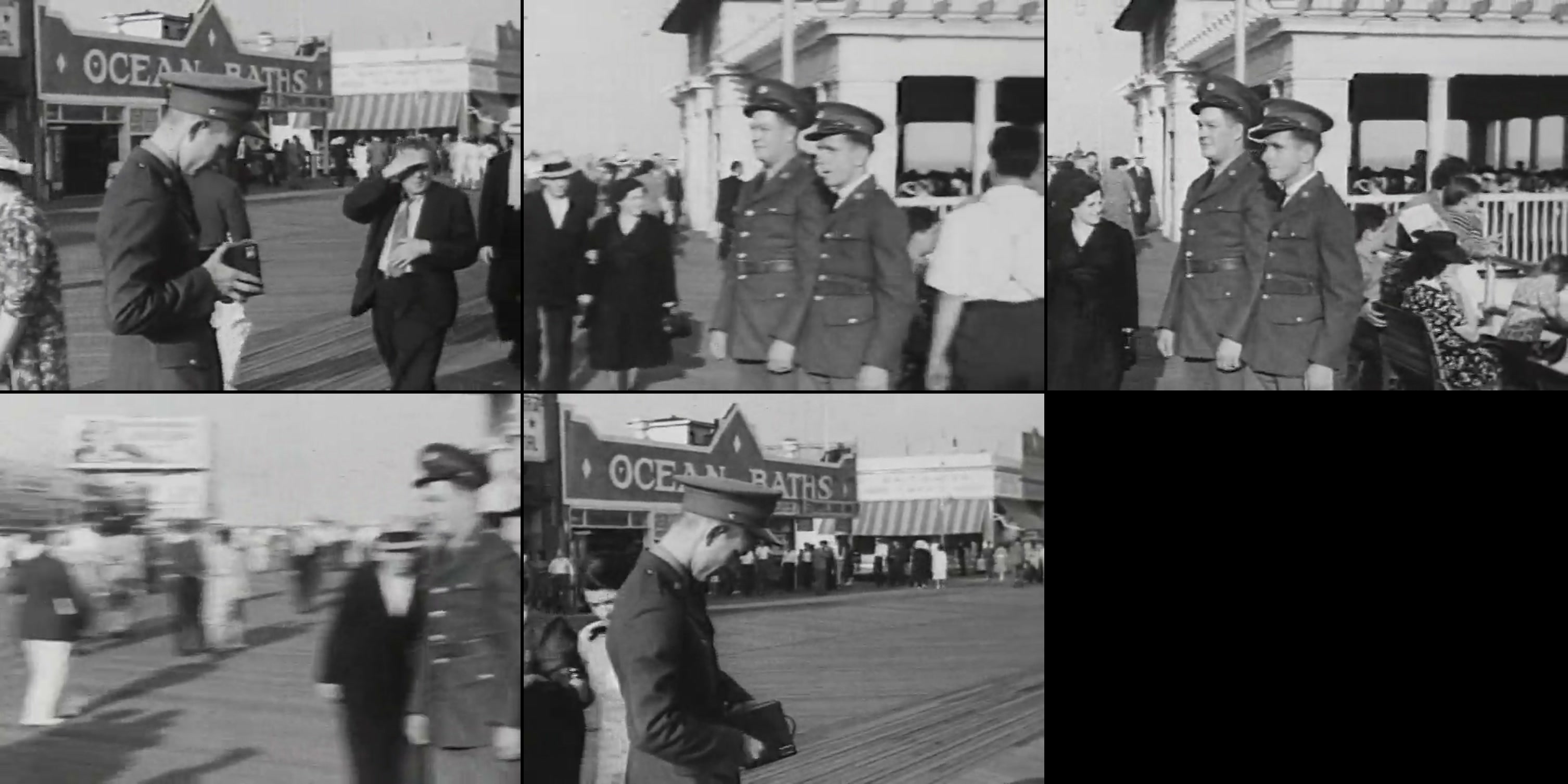
This step is for LTX and Seedance only. Topaz Starlight takes no prompt, so it has no five-frame review and no prompt writing. Before a prompt is written, five frames spread across the shot are laid out as a strip, with a colour check (black and white, faded or colour). The prompt answers three questions: what is in the shot, what must not change, and where the model is likely to invent.
5.2 Rules that held up
- 20 to 40 words. Period, place, light, materials, clothing.
- Colour footage stays neutral about colour and ends with a fixed tail: “natural colour, sharp photographic detail, natural faces, natural grain, high resolution footage”.
- Black and white footage does not force a black and white wording and does not use “natural colour”.
- Very small faces: “natural faces”, not “crisp”, which turns them plastic.
- Camera moves are not described. Everything that must not be invented goes in the negative prompt.
5.3 Positive prompt, an example
The prompt written for the shot in the strip above, 42 words (the rule is 20 to 40, so slightly long), following the rules: period, place, light, clothing, then the fixed tail. It names no colour and no camera move. The one line of text that must stay readable is quoted.
1940 documentary footage of a crowded Coney Island boardwalk in daylight, two soldiers in wool uniforms and peaked caps, men and women in period suits and dresses, a sign reading "OCEAN BATHS", natural faces, sharp photographic detail, natural grain, high resolution footage
5.4 Negative prompt
blocky compression, banding, mosquito noise, ringing, blurry, smeared,
ghosting, low resolution, plastic, oversharpened halos, warped faces,
logos, signage, lettering, modern vehicles, modern buildings, graffiti,
modern clothing
This base list is edited per shot:
| Remove from the negative | When |
|---|---|
| logos, signage, lettering | The shot contains lettering that must survive |
| graffiti | The shot contains painted art |
| modern buildings | Towers or buildings of the 1980s appear |
| blurry, smeared | Blur is wanted, for example an out-of-focus background |
| modern vehicles, modern clothing | The shot contains vehicles or clothing the model would read as modern, for example a spacecraft or spacesuits |
5.5 Text
It depends on the size of the lettering: big letters are usually fine, small ones are usually gibberish. On a shot with a banner, the first prompt produced invented words for the small text. Three options worked: quote the exact text in the prompt for the one line that must be readable; keep the rest blurred through the prompt and negative; or leave the lettering unreadable and add it back in the grade. A prompt written without looking at the frames also described an action that was not in the shot, which is why the five-frame step exists.
6Choosing the engine
| Engine | Behaviour | Used for |
|---|---|---|
| LTX Restore | Reconstructs much more detail | Very old archive and footage shot on film |
| Topaz Starlight | Faithful, restrained | Footage shot on tape, 1980s, where the picture must not be rewritten |
| Seedance (image to video) | Generates motion from still images | Shots that are too damaged: a recreated start image and end image, then one described camera move |
Topaz Starlight in practice
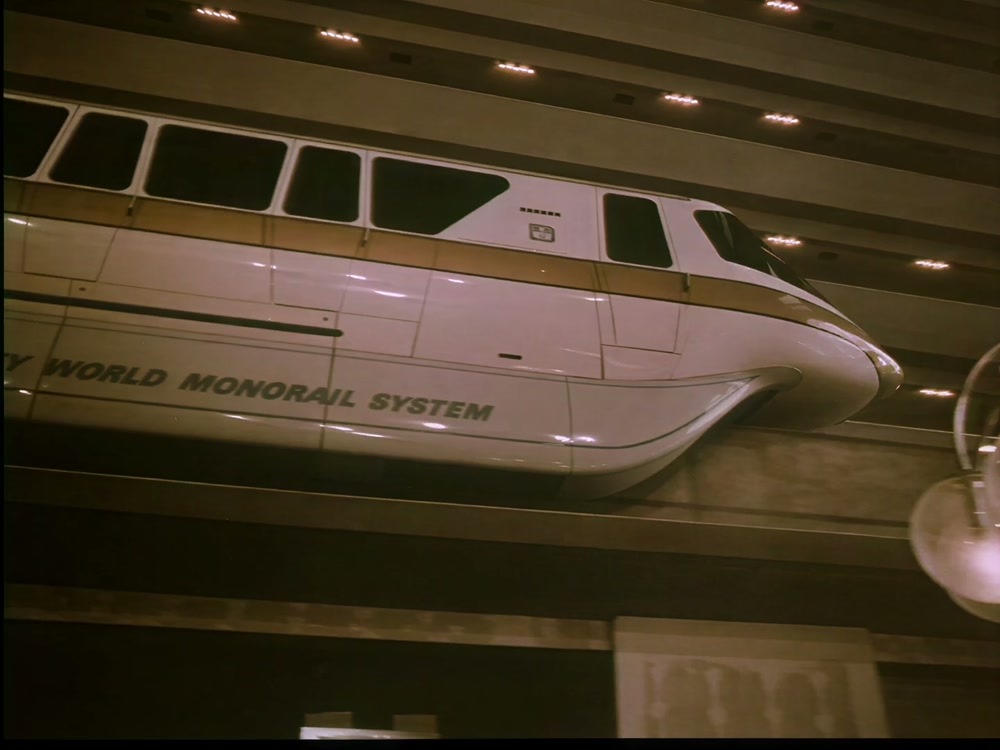
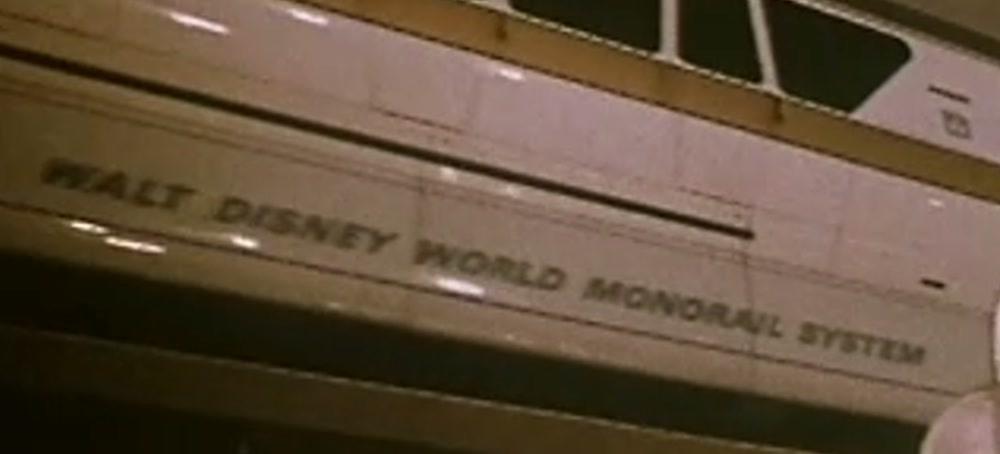
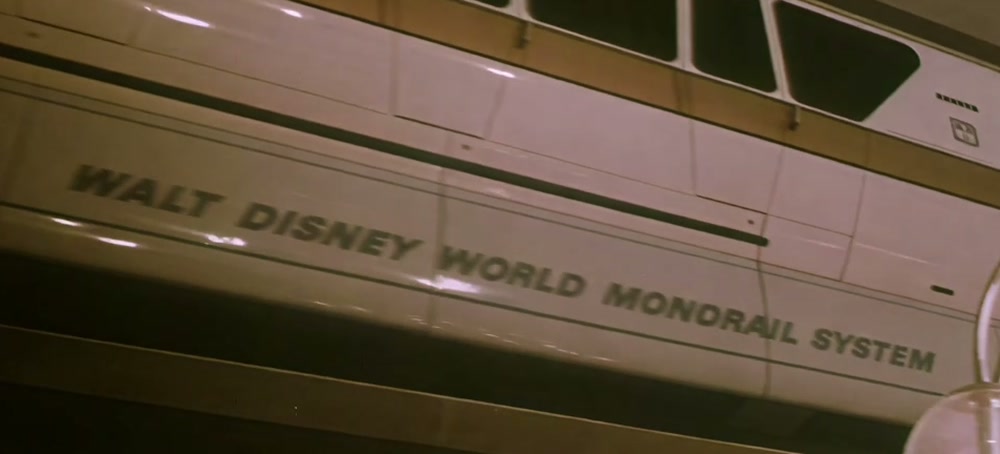
On footage shot on tape in the 1980s, where the detail is already there, Starlight recovers a surprising amount of information. The upscaled result can be a little too crisp, which is why the last step of the pipeline (below, in section 7) puts the patina back.
Example: an archive shot at 480p, and the result of Topaz Starlight Precise 2.6 (the model we used, in Topaz Video, 3× upscale, progressive) at 1080p. The picture is already well defined, so Starlight only has to add resolution and detail, and it keeps the look of the original.
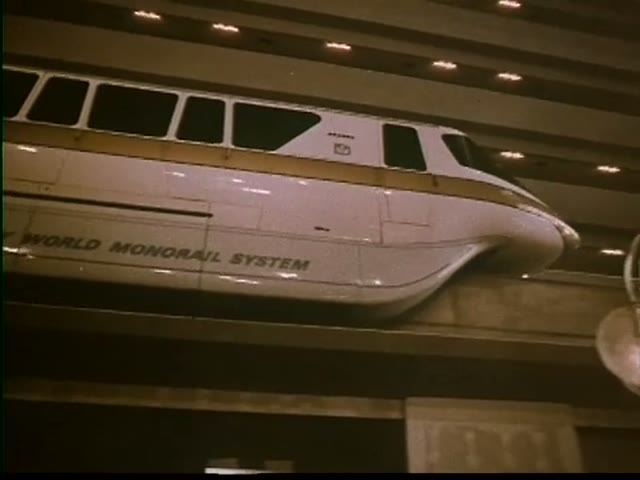
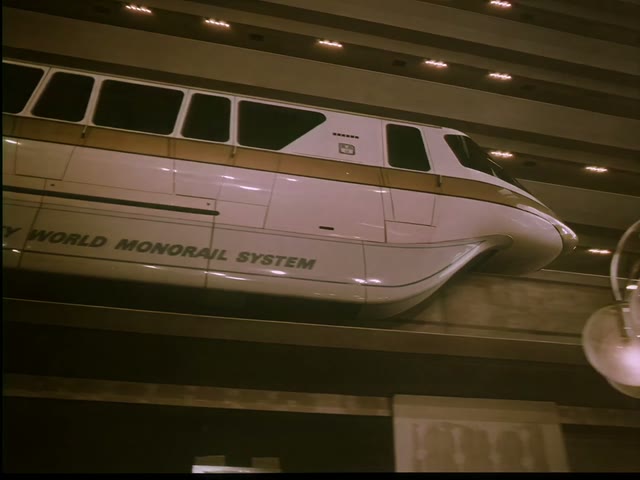
Topaz Starlight Precise 2.6, 3× upscale. The picture was already well defined: more detail and resolution, same colour and grain. Frame at 14 s.
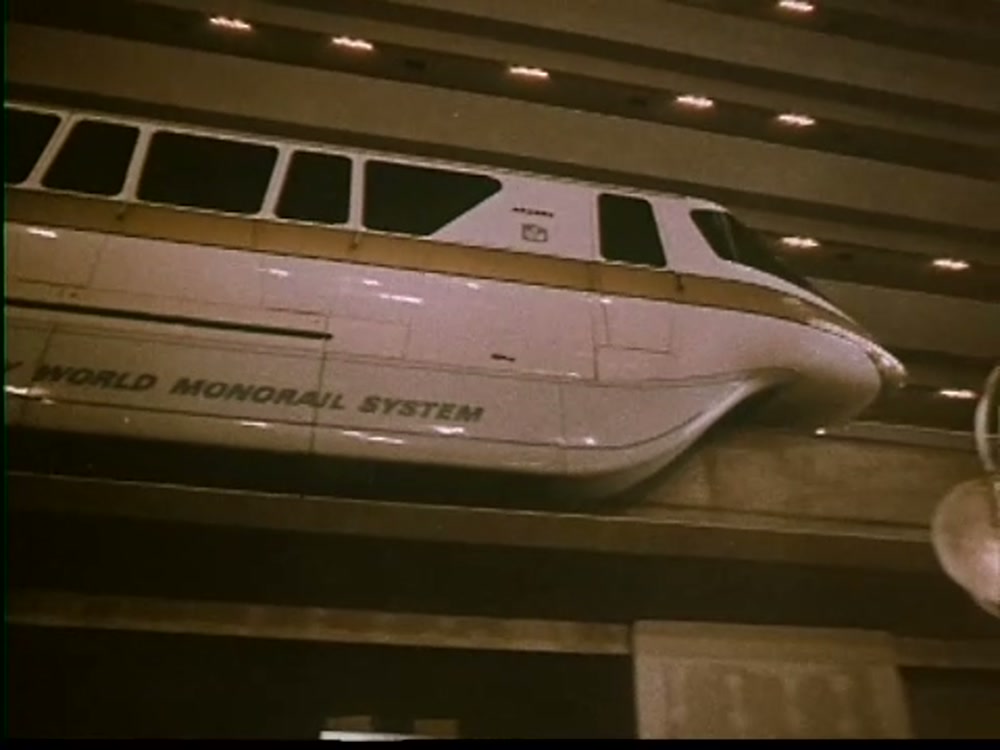
Freeze frames: the monorail
Two moments of the shot where the difference is easiest to see. Click an image to enlarge.
Share of plans and credits
| Engine | Plans | Share | Credits used |
|---|---|---|---|
| LTX Restore | 128 | 63% | 14,879 |
| Topaz Starlight | 70 | 35% | 347 |
| Seedance | 1 | 0.5% | 700 |
| Other | 3 | 1.5% | n/a |
With Seedance, the prompt must describe only what really happens in the shot, and nothing else. The order of work is: first the start and end images, then the animation between them.
Case: LTX on a 1940 film shot
A boardwalk at Coney Island, 1940, 640 × 480, 185 frames (already a valid 8n+1 count, so no padding). The prompt is the one in section 5.3.
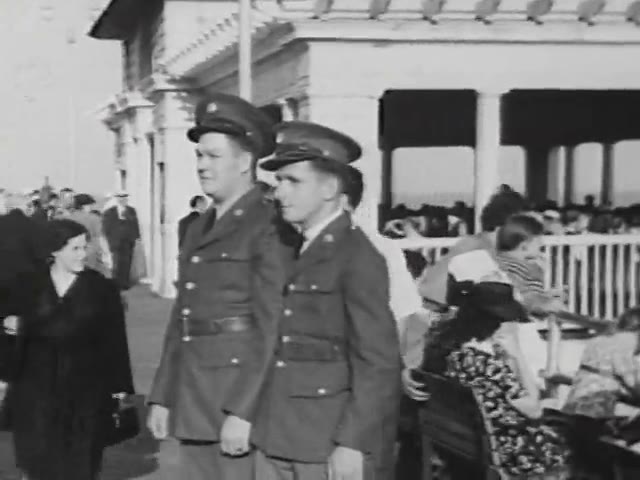
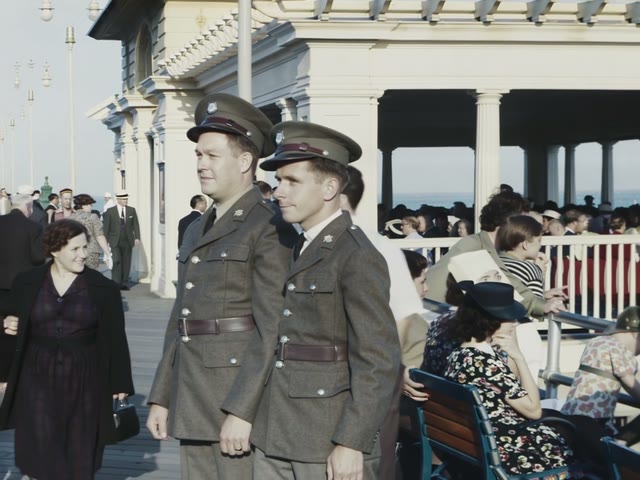
Colourised without any colour in the prompt. Small lettering on the neighbouring buildings is rewritten. Frame at 2.5 s.
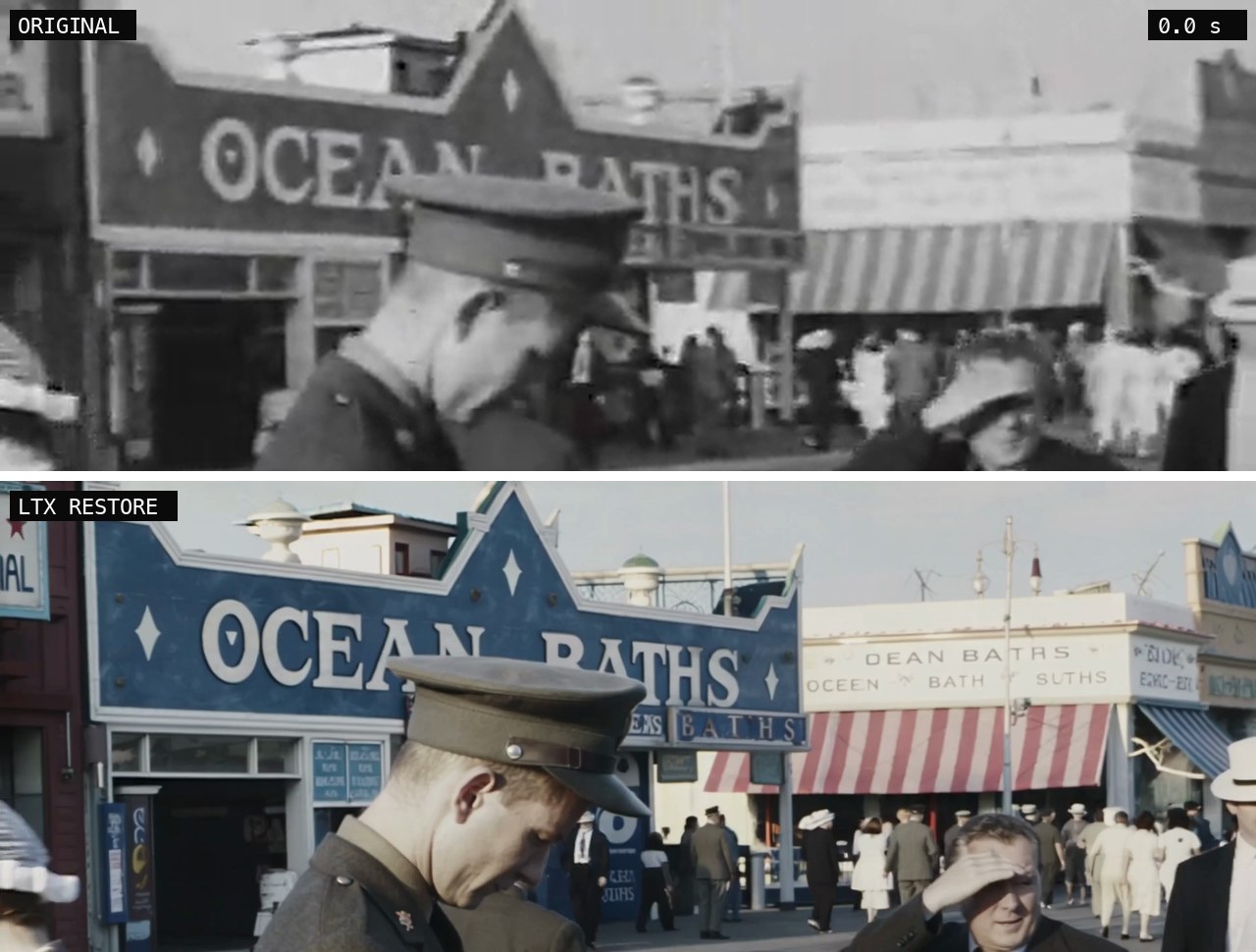
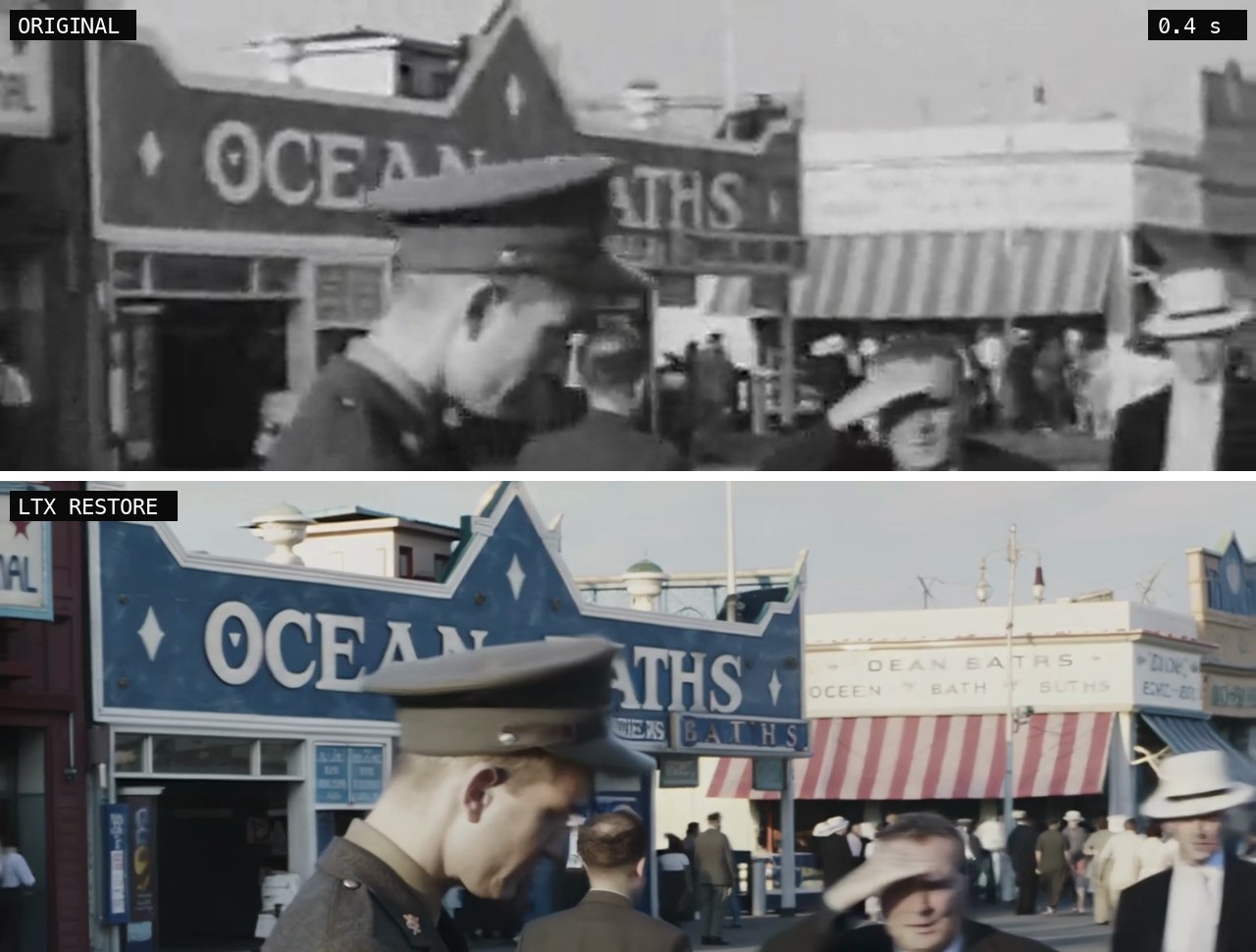
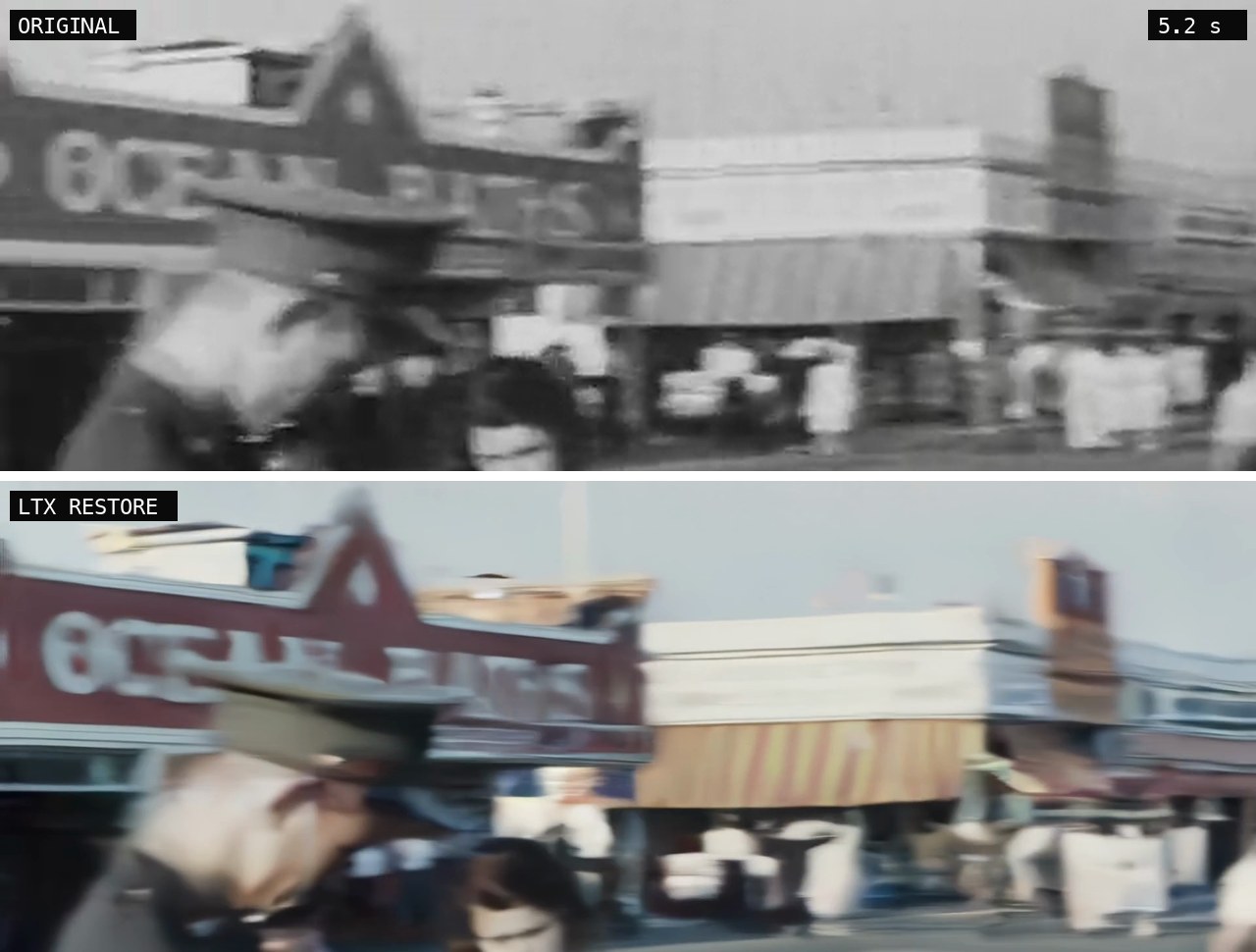
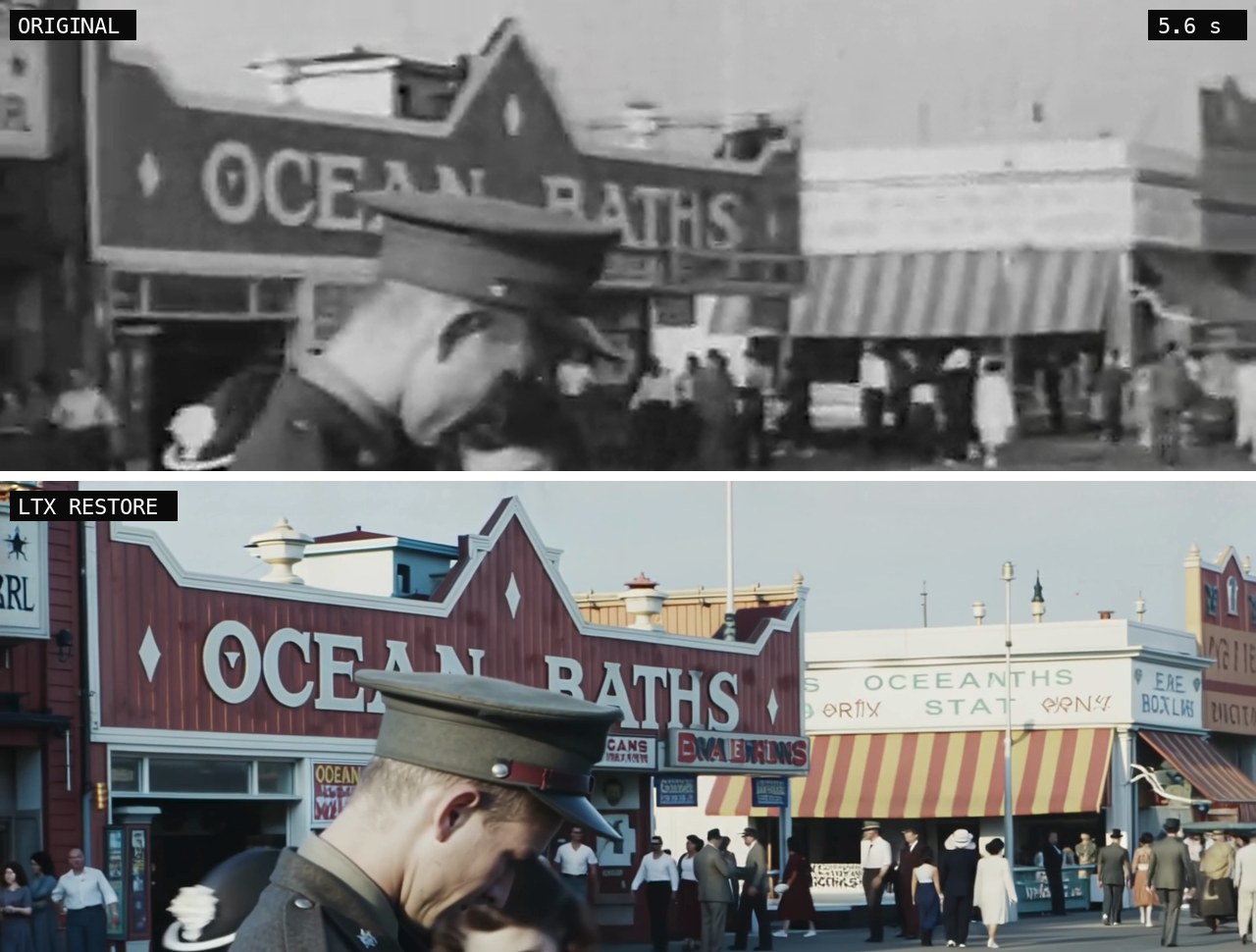
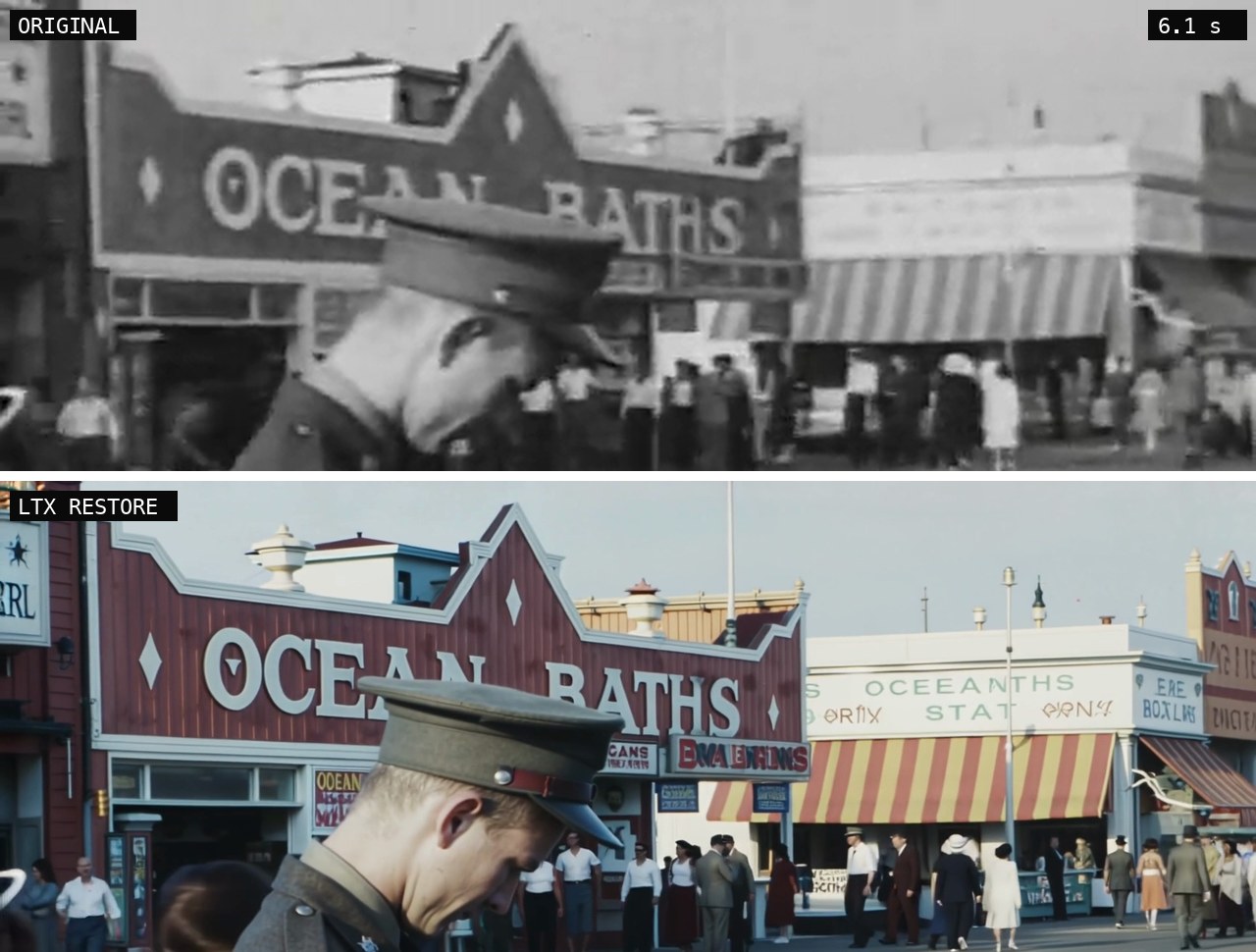
Limit. Most of the shot holds up well: faces, uniforms, the crowd. The main sign, quoted in the prompt, stays correct. Smaller lettering on the neighbouring buildings does not. It is mostly acceptable on the outward pass of the pan and gets worse on the return, where some signs turn into invented, garbled words (for example “OCEEANTHS” for “OCEAN BATHS”). Lettering that is not named in the prompt is rewritten, not preserved.
Freeze frames: the signs in the background
The top of the frame at six moments of the shot, original above and LTX below. Click an image to enlarge.
Second case: a food stand, and what LTX gets wrong
Another shot from the same film: customers at a hot dog stand, then a close-up of sausages on a griddle. 640 × 480, 265 frames (8 × 33 + 1, so again no padding). Positive and negative prompts:
1940 footage of a hot dog stand at Coney Island, customers in shirtsleeves eating hot dogs, a vendor in a white apron, rows of sausages on a steel griddle, natural faces, sharp photographic detail, natural grain, high resolution footage
blocky compression, banding, mosquito noise, ringing, blurry, smeared, ghosting, low resolution, plastic, oversharpened halos, warped faces, logos, signage, lettering, modern vehicles, modern buildings, graffiti, modern clothing
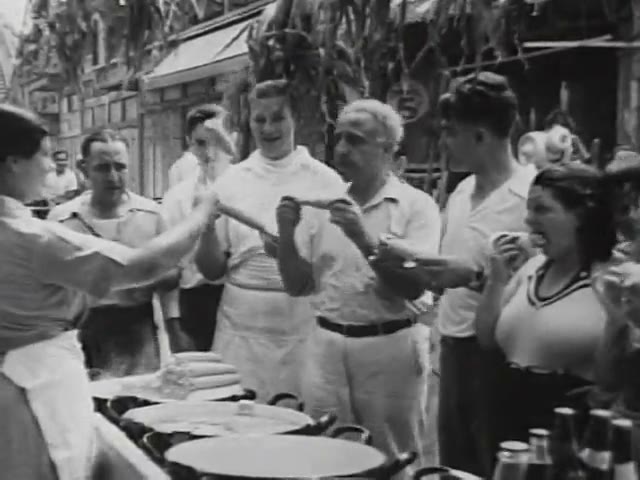
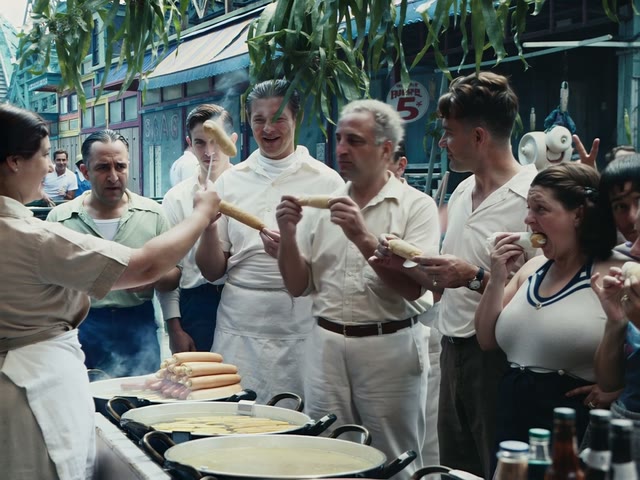
Colourised, with faces, clothing and food holding up well. Frame at 3 s.
Limits. Faces, clothing and the food hold up well, and the shot is colourised again although the prompt names no colour. The limit is camera shake: LTX does not stabilise heavily shaky shots, so they should be stabilised first for a better result.
Case: when Topaz and LTX both fail, recreate the shot with Seedance 2.5
An airport shot from 1986, soft and low in contrast. Three attempts, in order.
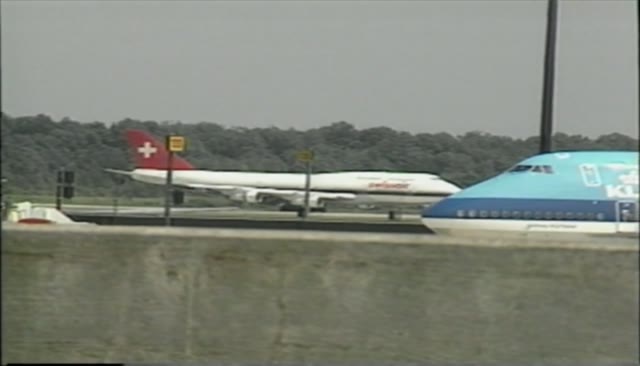
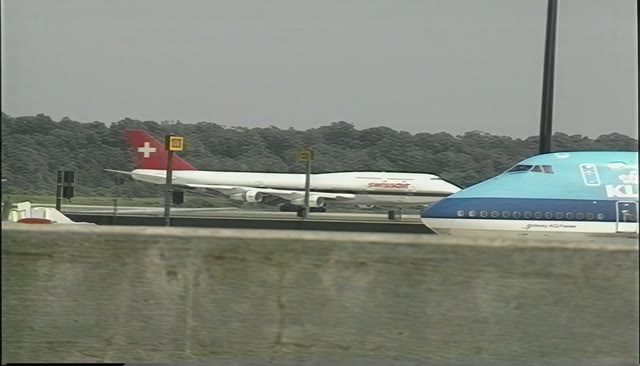
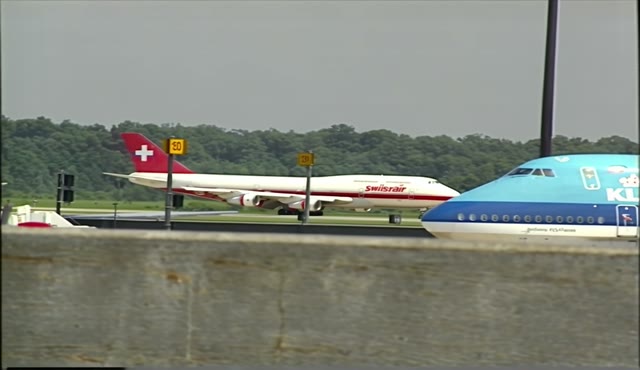
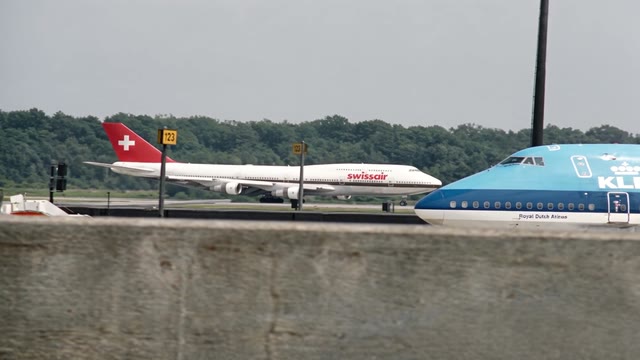
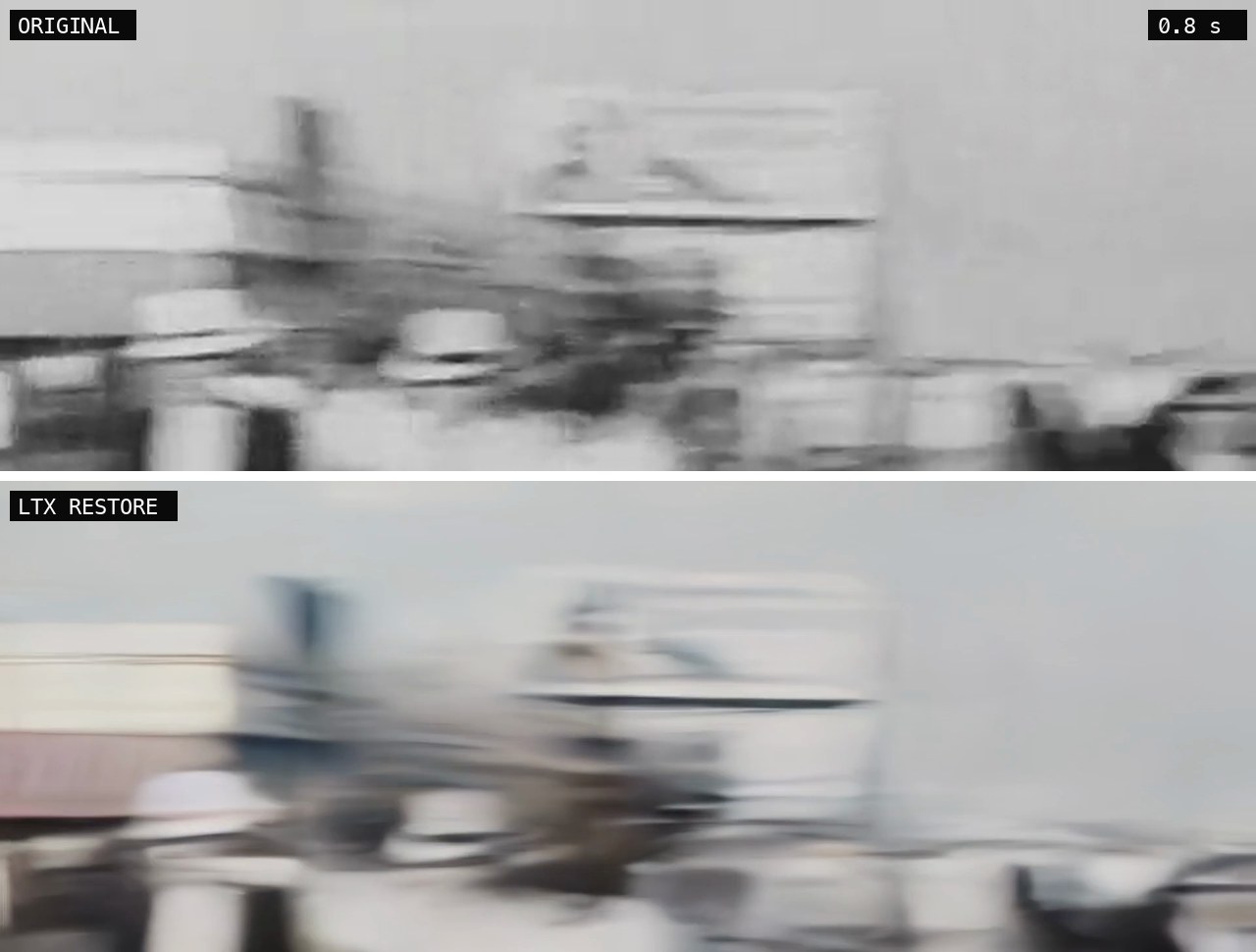
The same shot at 0.8 s, four ways. Only Seedance writes “swissair” correctly.
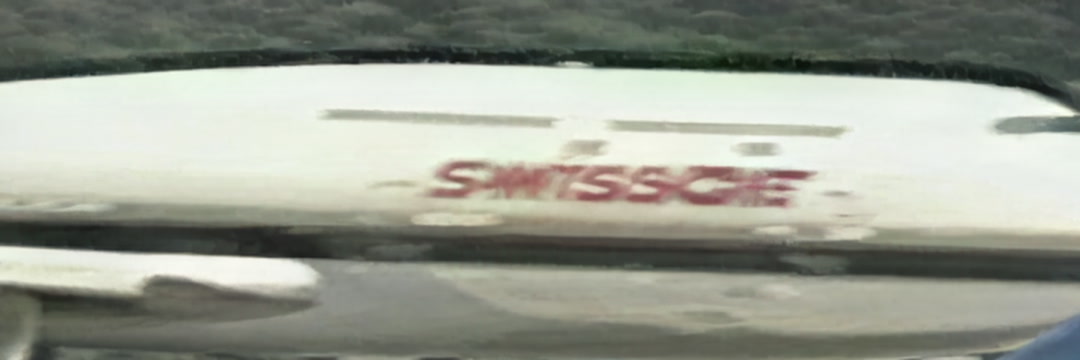
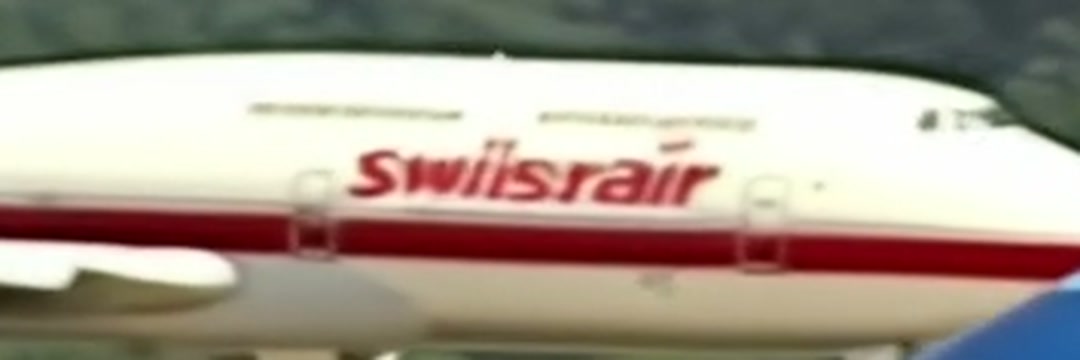
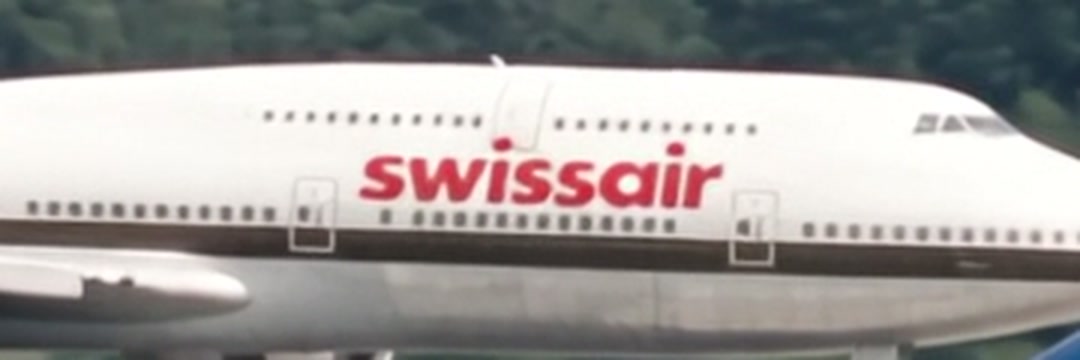
Zoom on the lettering
The same fuselage, cropped from each version at about 0.8 s. Click an image to enlarge.

How the lettering was fixed
Neither Topaz nor LTX could be made to write “swissair”. With Seedance, the lettering is fixed before the animation starts: the recreated start and end images, shown just below, already carry it correctly (“swissair” on the fuselage, “KLM” and “Royal Dutch Airlines” on the other aircraft). They become the first and last frame of the clip, and the prompt ends with one instruction, “Keep the airline lettering unchanged and legible.” The clip then inherits the text from its two images instead of inventing it.
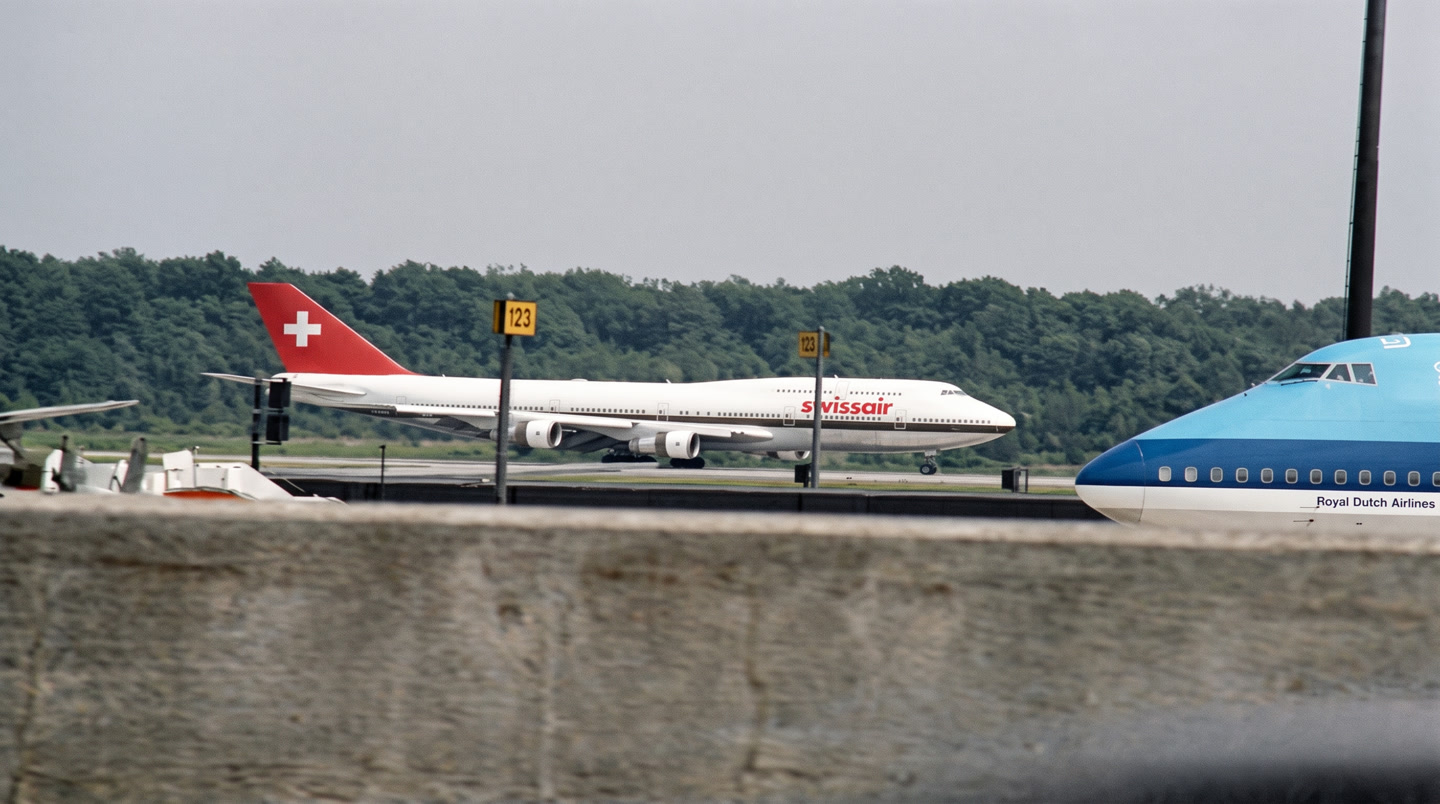
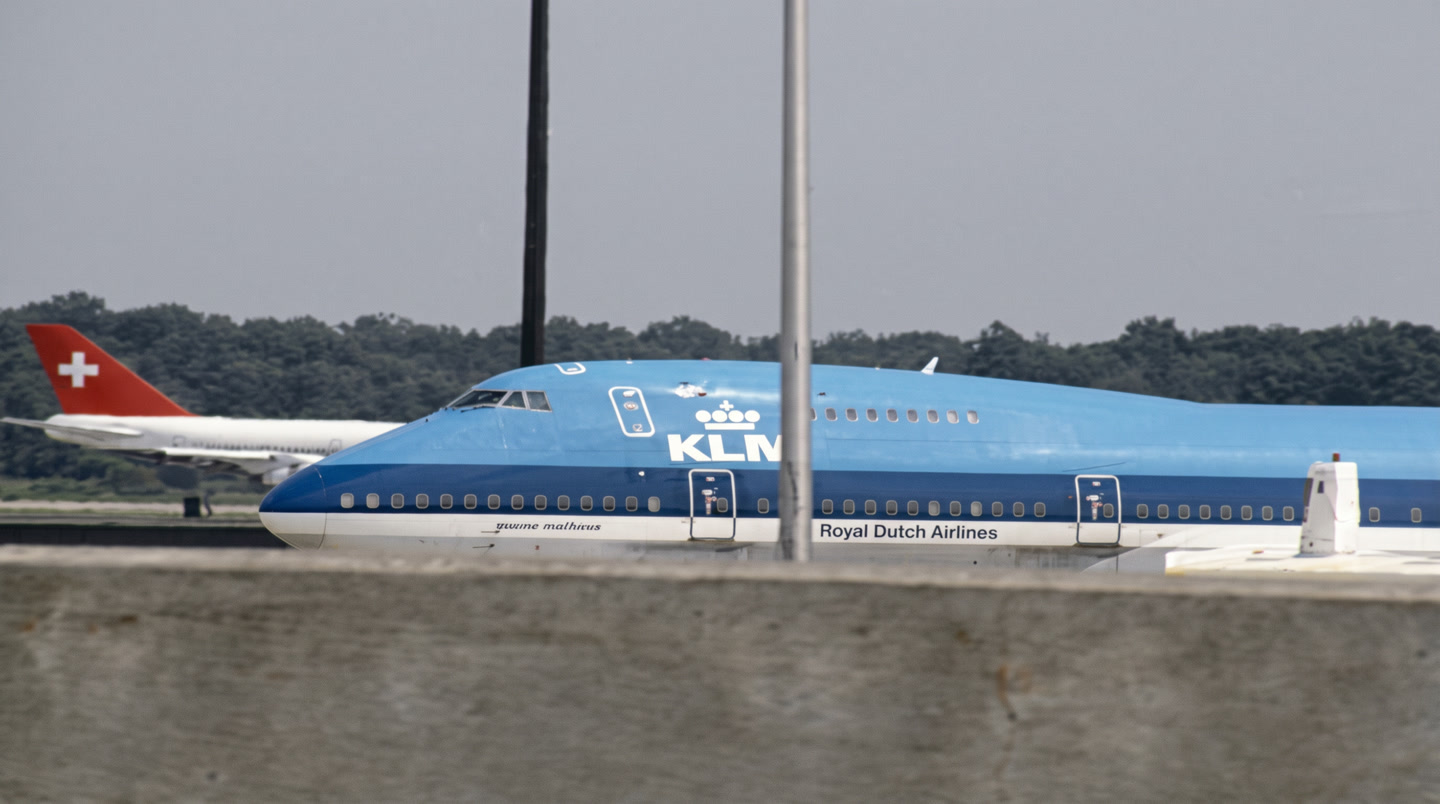
The prompt describes one camera move and states that the aircraft do not move. It also asks to keep the airline lettering unchanged.
@image1 is the first frame and @image2 is the last frame.

SHOT 1: Slow pan right
Wide documentary shot at an airport apron in the 1980s. The camera pans slowly to the right along a long grey concrete wall at real-time speed (24fps), with a very subtle handheld drift. The parked blue and white KLM Boeing 747 is progressively revealed from its nose to its fuselage while the white Swissair 747 with its red tail and white cross slides behind it on the left. Two thin poles in the foreground drift from right to left across the frame. The aircraft do not move. Overcast grey daylight. Keep the airline lettering unchanged and legible.

SFX: low airport ambience, distant jet whine. No Music.
7Re-import into the edit
Restored shots are placed automatically (DaVinci Resolve driven by Claude through an MCP server) on a dedicated track at their original record position, scaled to fit, and trimmed to the frame count in the manifest. Three details cost us time:
- In the Resolve API, the end frame of
AppendToTimelineis exclusive. Passing the clip’s frame count keeps every frame; passing one less loses a frame, and the conform loses a second one. - Scripts that run in the editing software time out after about 10 seconds, so work is done in chunks.
- The result is trimmed to the manifest length: the source range can differ by a few frames from the timeline length (for example 112 against 89).
Last step: getting the patina back
The work has two steps. Step one is restoration: the AI recovers detail that the original did not show. Step two is getting the patina back. After the shots are back in the edit, our in-house colourist grades them and applies degradations: softness, grain, texture. The restored image is deliberately a little too clean, and that is the point. Once the detail has been recovered, it can be manipulated afterwards, in the grade, instead of being locked into the result of a single render. The shot ends up more readable and still looks like the footage it came from.
8Tracking and quality control
Each shot passes through five states: exported, rendered, imported, validated, issue. They are stored per shot and shown in a dashboard with a stage bar per batch. Assistants and technicians mark import and validation; shots with an issue get a red tag in the file system and a note. Shots whose alignment needs a human check get an orange tag until a person clears them.
Validation is manual and per batch: the editor checks the first and last frame and the length of each shot in the timeline. A batch is not closed until its flagged shots are cleared.
9Failure log
| Symptom | Cause | Fix |
|---|---|---|
| Black first frame | Video stream starts one frame late in some H.264 files | setpts=PTS-STARTPTS at the start of the chain |
| Wrong in-point | Fields counted as frames; MXF start offset | Halve for interlaced sources; correlate stills |
| Confident but wrong start | Stale stills from the timeline | Refresh the stills; check first and last frame by eye |
| Handles lost on re-import | Handle only before the clip, length 18 instead of 20 | Export exactly the used range |
| Lost frame in the timeline | Exclusive end frame in the API | Pass the full frame count |
| Invented lettering | LTX cannot copy small or blurry text | Blur it, quote it in the prompt, or add it back in the grade |
| Prompt describes an action not in the shot | Prompt written without looking at frames | Five-frame review before every LTX or Seedance prompt |
| Wrong frame count for the model | Model requires 8n+1 | Pad the tail, cut after the render |
10Limits and what we would change
- Results depend on the model version. The prompt rules here were derived for LTX 2.5 and may need revision.
- The alignment step is the most fragile. A stronger approach would carry the source timecode through the whole chain instead of re-deriving it.
- Tape sources with large moving areas remain hard to stabilise.
- Validation is manual. We have no automatic way to detect an invented detail.
References
- Prelinger Archives, Internet Archive. Source of the archive footage used in the examples, except the airport shot.
- Comfy Cloud, hosted ComfyUI, used to run LTX.
- Lightricks, LTX-2.5-22b-IC-LoRA-Restore, model card, Hugging Face. Prompt guidance and frame constraints.
- Topaz Labs, Topaz Video (Starlight models).
- ByteDance Seed, Seedance 2.0.
- FFmpeg documentation: yadif, tpad, prores_ks.
- Blackmagic Design, DaVinci Resolve (scripting API documentation ships with the application).
- Model Context Protocol.
Credits
Written by Arno Faure. The team on the project:
- Arno Faure, Director of Creative Technology and Innovation
- Eleonore Moreau, Producer, Post-Production
- Thomas Le Lay, Online Editor
- Clarence de Bayser, Technician
- Marc Boucrot, Colourist
- Tristan Lauzon, Colourist